Accessibility


Introduction
The internet connects people to information and to each other. However, the digital world, like the physical world, is not inclusive of everyone. There are many barriers that can arise with digital technology, and these affect people in different ways at different times of their lives. Technology inevitably reproduces societal biases, and therefore, content creators should intentionally consider accessibility in the design process. Accessibility is more than a box to be ticked—it is never fully achieved but rather continuously improved.
Accessibility refers to practices that ensure everyone can access and interact with digital content, regardless of their physical capability, neurodiversity, or socio-economic status. People encounter barriers when content isn’t designed for the different ways that they can interact with technology. For example, people with blindness, low vision, and colour blindness cannot access some visual information or content that is navigated visually. Information presented only in an audio format is not accessible to people who are partially or completely deaf. Technology that works only through the use of a mouse, for example, is not accessible to people whose mobility or dexterity requires other tools like keyboard shortcuts or speech-activated commands.
In addition to physical challenges, geographical location and socio-economic status pose barriers to digital information access. The term digital divide is used to describe the gap between people who have access to the internet and other digital technologies and those who do not.
Accessibility guidelines and best practices
Since webpages are by far the most common way that people interact with digital information, web accessibility is crucial.
There are three fundamental guidelines to follow when designing webpages:
- Web content should be designed in accordance with regulations such as: the Web Accessibility Guidelines and the Web Content Accessibility Guidelines (WCAG 2.0) published by the World Wide Web Consortium.
- All information should be presented with more than one access option, for example, text should also have an audio option for visually-impaired users.
- Users must be able to operate the accessibility tools built in to the relevant software or on their own device.
Here are some best practice tips when designing a webpage or other digital content (such as documents and presentation slides):
- Don’t rely only on colour to tell a story. Give explanations as well. If it’s essential to use colour, make sure the contrast is high.
- Include a voice recognition option.
- Have a good layout, including clear headings, navigation bars, and consistent styling.
- If there are links inserted on the webpage, make the font size of the link bigger, for mobility-challenged users.
- Give an option to adjust the font size of the webpage.
- Always include accurate captions for videos.
- Avoid using animation, but if necessary, include a warning, because some animations trigger epilepsy.
- Ensure the content is accessible without a mouse.
- Avoid using videos and graphics that take a long time to load, as these might be inaccessible to those with unreliable or slow internet connections.
This video highlights the experiences of students and faculty with disabilities in higher education.
Digital divide
The digital divide refers to the split between the population who can access information via computers and smart phones, etc. and those who cannot. Originally, the term merely referred to internet access, but now, it is an umbrella term covering gaps in accessing internet infrastructure, applications and services.
The digital divide has never been so evident as during the COVID-19 pandemic. When the world went into lockdown, the importance of access to technology was clear. The advantaged population continued to conduct their lives in an alternative way during the isolation, through telemedicine, video conferences, virtual classrooms, online shopping, etc., while others couldn’t, exacerbating the gap already created by the digital divide.
There are several factors contributing to this inequity: local infrastructure, economic status, race, gender, physical and mental ability, and age.
The impact of the digital divide is enormous and increases over time, going beyond inequity in accessing technology to include economic and social consequences and barriers. Governments and non-government organizations have a role in taking action to build infrastructure where it is lacking and fund libraries and other institutions that promote digital literacy and connect people with technology.
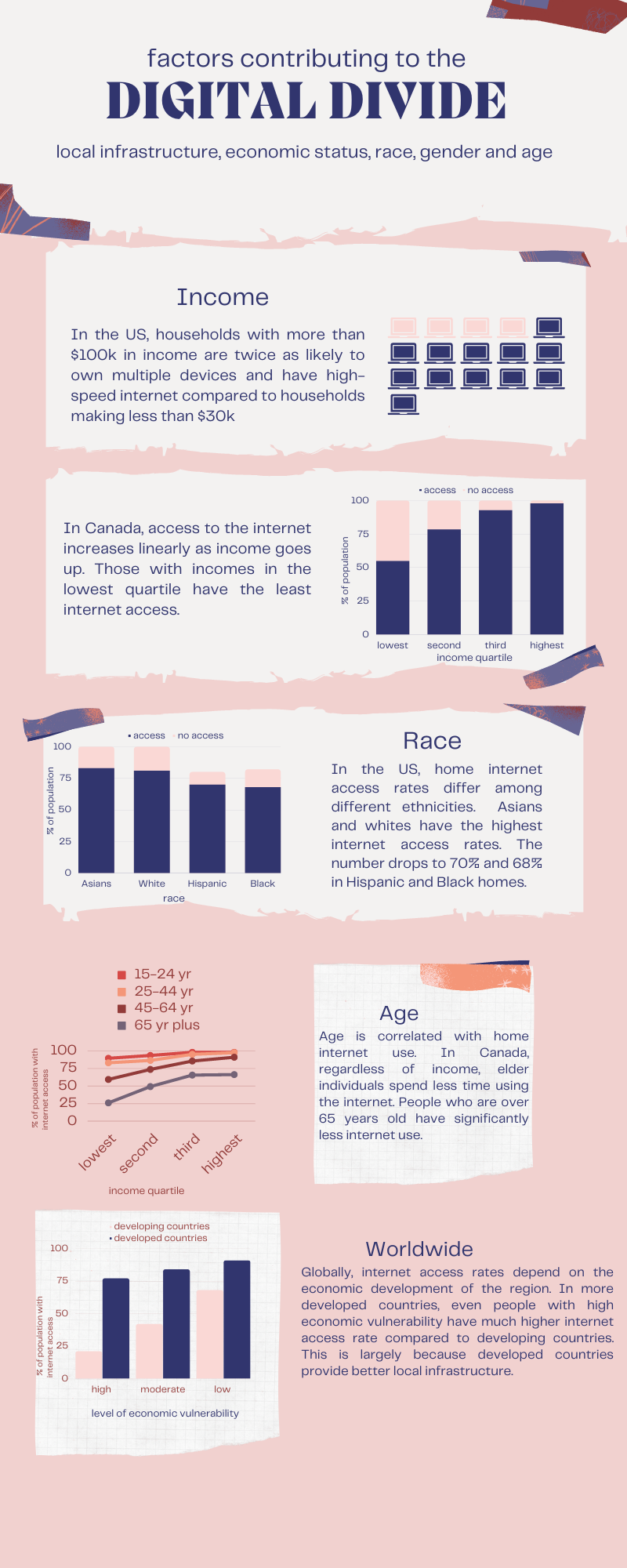
click image to enlarge
Conclusion
Digital technology and information should be for all people, regardless of their devices, languages, location, gender, race, or income. Accessibility should be a fundamental goal when designing digital content keeping in mind the different ways that people interact with and perceive the world.
Quiz
Activities

This activity gives you an opportunity to try accessing the web pages that you usually visit in a different way.

Use the list of keyboard shortcuts supported in Chrome or Firefox to do your daily online tasks, such as browsing social media, checking email, or online shopping. Think about: Are there any sites that don’t work well? Can all the sites be used without a mouse?

This activity should take about 10 minutes to complete.
Let’s reflect more on some facets of digital accessibility.
Write approximately 200 words about what you’ve learned about barriers that people might face when using digital technology and how they might overcome them.
This activity should take about 10-15 minutes to complete.
This activity helps you to learn more about the digital divide in Canada.
Read “How COVID-19 worsens Canada's digital divide” and reflect on what are the contributing factors of the digital divide. Do you think that the Canadian government’s strategy of investing in broadband infrastructure as described in the article will be successful to allow 100% of Canadians to connect to the internet by 2030?
This activity should take about 5 minutes to complete.
Are you an undergraduate student participating in the FutureBound program?
After reviewing the content and completing the
activities for one of
the Things, you can complete a
reflection form
to have it count as one activity towards your
Digital Capabilities & Mindsets certificate!
Resources

Introduction to Web Accessibility
Learn web accessibility and apply best practice WCAG 2.1 accessibility patterns and techniques to your websites.
See more
Digital Divide
Investopedia article from 2022 that defines the digital divide and explain what is being done to close it in the US and worldwide.
See more
Robin Christopherson: Technology, the power and the promise.
24-minute talk about the potential of technology to change people’s lives regardless of their abilities.
See moreReferences
Emily A. Vogels. Digital Divide Persists Even As Americans With Lower Incomes Make Gains in Tech Adoption. Pew Research Center, 2021.
Statistics Canada. Table 22-10-0081-01 Location of Internet Access By Age Group and Household Income Quartile, Inactive. 2021.
Statistics Canada. Table 22-10-0007-01 Household Access To the Internet At Home, By Household Income Quartile and Geography, Inactive. 2021.
23 Things for Digital Knowledge: Accessibility. University of Edinburgh, 2016.
S. Derek Turner. Digital Denied: The Impact of Systemic Racial Discrimination on Home-Internet Adoption. Free Press, December 2016.